How do you design a link building strategy?
To be able to measure a campaign's results, we need to put in place a strategy that sets out what we want to achieve and what means we're going to use to reach those goals.
As you know, Growwer makes creating and managing link building as easy as possible, so your campaigns deliver the best results with the least possible effort. You just need to add your project to the tool and enter the basic information the page asks for to receive the best proposals of media outlets and blogs to publish on.
Once you've reviewed the proposals, you only need to choose the media outlets you're interested in, and the tool takes care of everything else: writing the content, managing the purchase with the media outlet and checking that the order meets all your conditions. On your side, you only need to confirm that everything is correct before publication.
SEO opportunities report
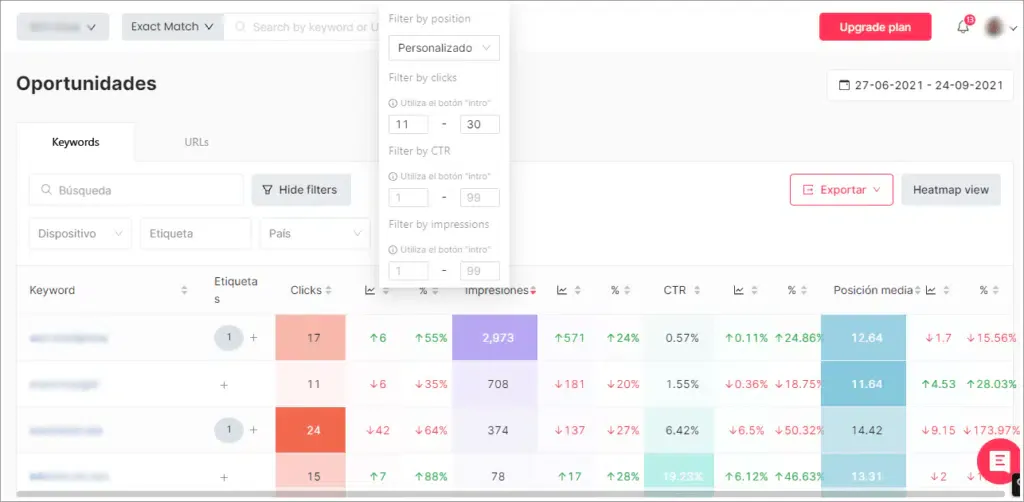
As with everything in SEO, you have to start at the beginning, and keywords are usually the first piece of the strategy, so if you're not yet clear on which keywords you're going to work on in your link building campaign, the SEOcrawl opportunities report will make this first step much easier.
Simply open the opportunities report from the side menu of your project dashboard and use the available filters to discover the keywords you want to work on. How about starting with the project's core keywords that rank on the second and third page?
Analyzing the current position of your keywords
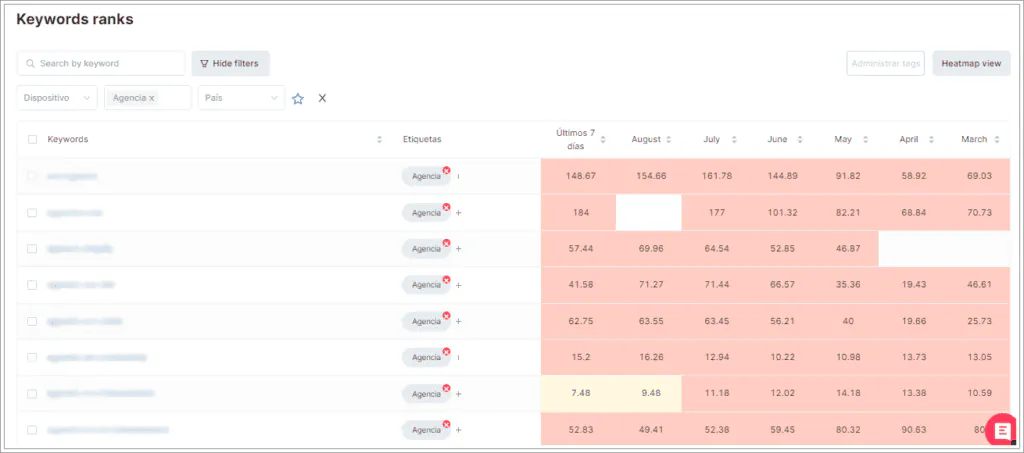
Use the Rank Tracker feature to follow the position changes of the keywords you work on in each campaign. Tag the keywords you use in each campaign so you can easily filter them later (for example, LB-month-year).
Our recommendation: write down the current position of the keywords before you start working on them. That way, it'll be easier later to see how they evolve and check whether or not the link building strategy is having the desired effect.
Selecting the landing pages
Once you've decided which keywords you'll work on in each link building campaign, you need to select the specific landing pages or URLs you're going to link to, using the keywords from the previous point as anchors.
In some cases, such as ecommerce categories, it's very simple, but there may be times when the choice gets a bit more complicated, even creating some risk of cannibalization.
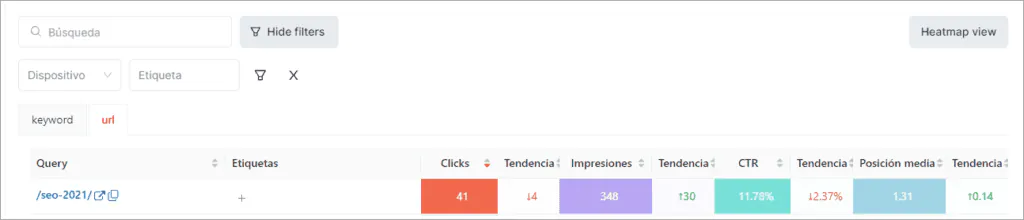
To avoid this, from the Rank Tracker itself, click on each of the keywords you've chosen and you'll reach a screen with information about it: if you choose the URL tab, you'll find out which landing page is ranking for that query: that's the one to choose.
Annotations to track the publication date
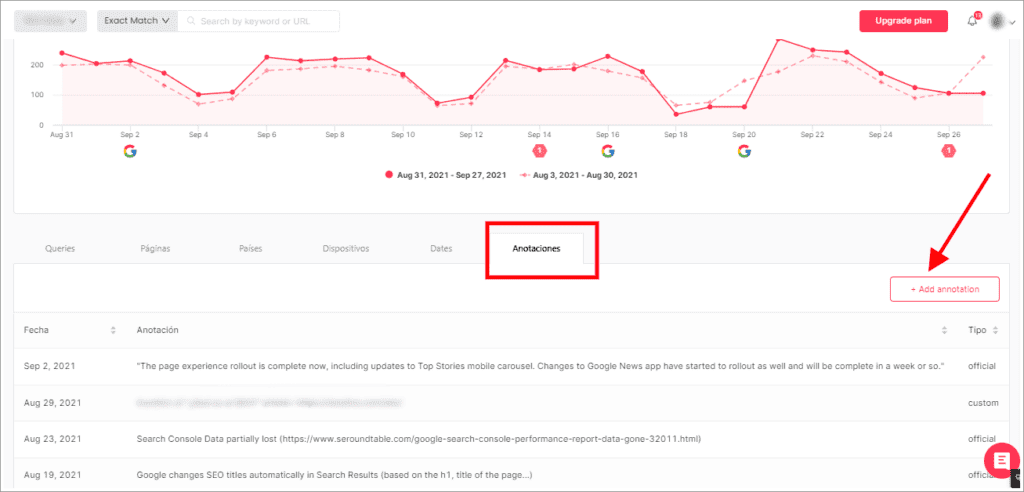
Not all links are published, or indexed, on the same day… When tracking results, it's essential to know the day it went live for each of them, but also when Google noticed they were there.
To do this, go to the general visibility report in the side menu of your dashboard and scroll down to the annotations tab. Use the Add annotation option to include a comment with the publication/indexing of each link.
Tracking results
So far, we've chosen anchors and landing pages, we've set up the link building campaign and we've noted the publication date of the links. Now is really the time to analyze whether all this previous work has paid off or whether we need to make some changes to maximize the results.
Once again, SEOcrawl makes it easy for us with three different options: the Position tracker, the Keyword map and the Top Changes feature.
Rank Tracker
An essential tool for measuring the success of your link building campaigns is a link rank tracker. This type of app tracks the position of your links in search engine results, providing valuable information about how your link building efforts are performing.
You already know the position tracking option the tool offers. Checking how your campaigns are performing is as simple as opening it, filtering by the tag we've assigned to each of them (that's why it's so important to tag correctly and intuitively) and checking how the positions of the keywords you worked on have evolved over the last few months.
By default, SEOcrawl shows you the changes over the last 7 days, as well as the previous 6 months.
If you want to succeed in your link building campaigns, we recommend you start using a link rank tracker if you aren't already. This tool will help you measure and improve your efforts, which in the long run will let you get better results in your digital marketing campaigns.
Pages metrics
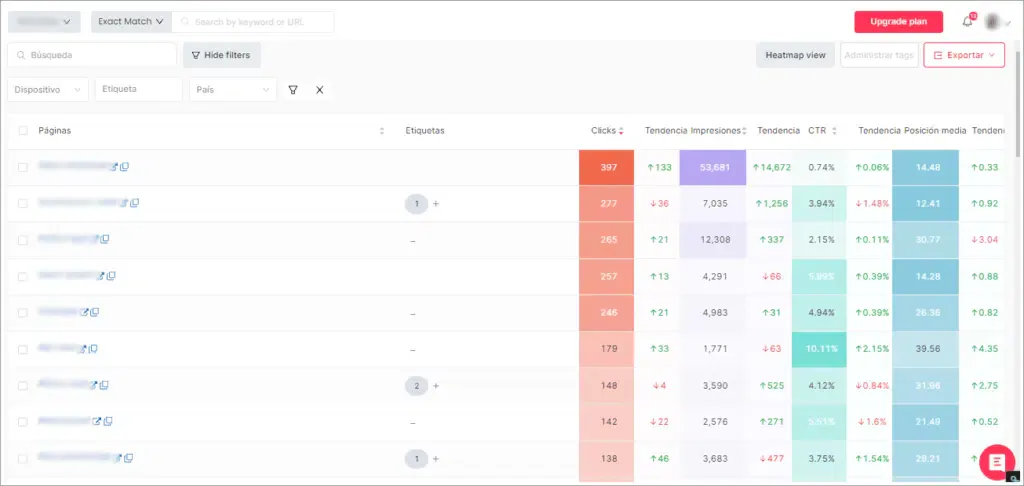
Another simple way to track results is to review the metrics of the landing pages that took part in each campaign. Since you know which specific URLs you've built links to (as long as you've tagged them correctly so you can filter them easily), it'll be very easy to know which ones improve and which don't and to analyze the problems in those that didn't evolve as expected.
If you want to learn more about the potential of a completely free link building tool like Growwer, sign up in 1 minute
Top changes
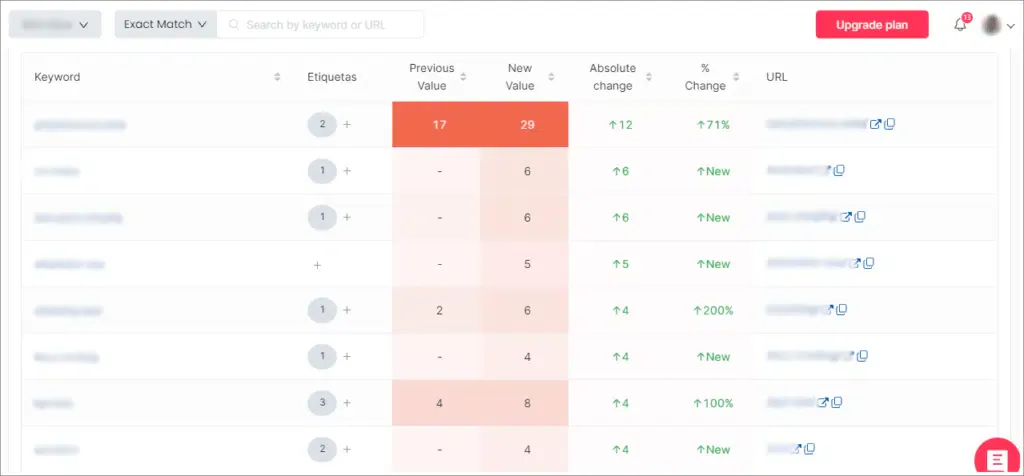
With this feature you'll be able to see the most important changes in your keywords at a glance. Again, if you've set up your tags correctly, it's much easier: it's as simple as setting the time period you're interested in, filtering by the tag of the specific campaign you want to analyze and... magic!
You'll get the list of keywords with that tag, where you'll see the previous and current position, the absolute and percentage change, and the URL that the keyword ranks for. Super easy!
We've talked to the SEOCrawl team, and if you want to try SEOcrawl's link building campaign analysis for FREE, they've given us two options so you can choose the one you like best:
- 1 month FREE on the Elite plan if you enter the code GROWWER when you sign up
- 1 month FREE on the Enterprise plan with no limits if you request a DEMO
SEOCrawl can undoubtedly make tracking the whole campaign much easier for us.