Written by Sergi Lechado
Let's start at the beginning: a link is a reference from one website to another (external link) or to another URL on the same domain (internal link).
For those starting from scratch, and so there's no doubt, if you go to the first paragraph of this article, you'll see that both types have already been introduced:
- The first one on the word Rodanet, which points to an external page.
- The second one on the word Growwer, which points to an internal page on the same domain.
Both are links. Links that let us navigate from one page to another and that are essential from the moment we open the browser on any device. We're following links all the time; without them, the web doesn't exist.
These links are detected and evaluated by Google, which gives them value as a signal of authority, relevance and trust, so they have a direct impact on the rankings of the linked destination page.
What is a dofollow link?
A dofollow link is a normal link. By default, every link is dofollow.
To understand why the “dofollow” attribute exists, the story goes back to 2005, when Google, to prevent the abuse of links that was taking place to manipulate search results, invented the “nofollow” attribute.
That's when the appearance of a new attribute called “nofollow” led to all other links being classified as “dofollow”.
So we could define a dofollow link as any link that doesn't contain the “nofollow” tag.
So what's the difference between Dofollow and Nofollow links?
The theoretical* difference is simple: if you add the “nofollow” attribute to a link, you're telling Google's spiders not to follow it, and therefore not to pass on that authority signal and not to take it into account as a ranking factor.
This way, the dofollow link is the one Google still uses as a signal that passes relevance to the linked page, which makes it an important ranking factor.
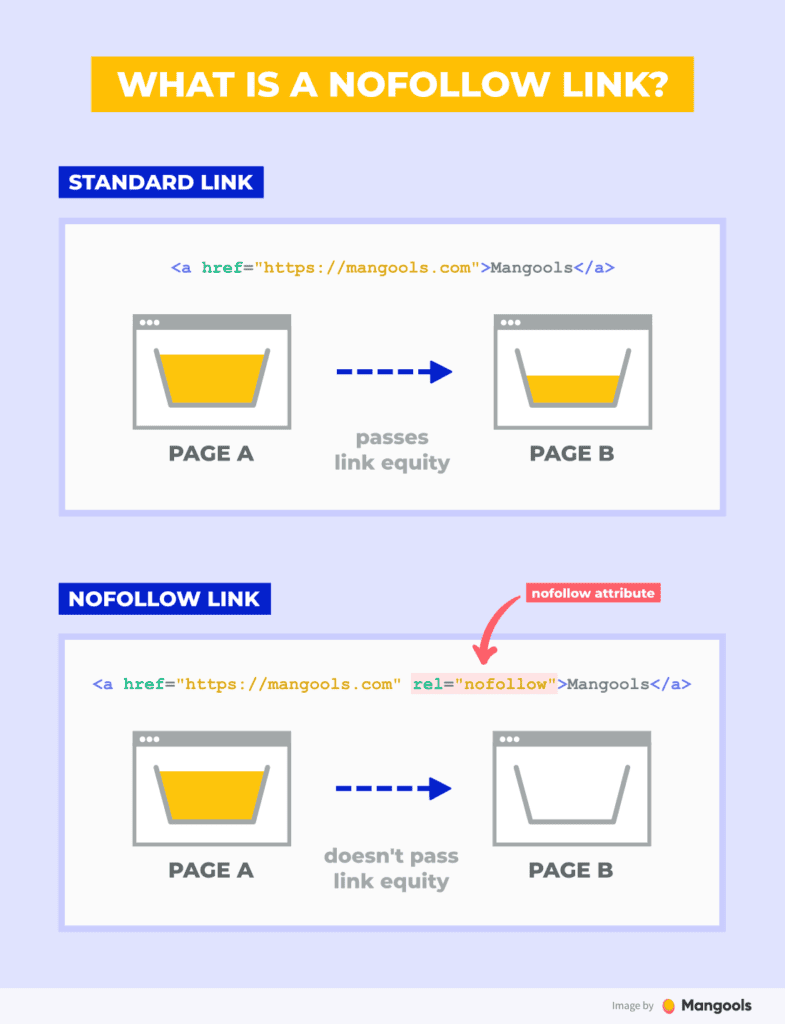
*We stress the word “theoretical”, because many experiments have been run in the industry on whether Google's spider really follows that “nofollow” or not, with results that, in some cases, cast doubt on it.
But that would open another debate, one worthy of its own article 😉
How do you know if a link is Dofollow?
As we said at the start of the article, every link is dofollow by default. This means you don't need to add any attribute in the HTML code. Any link that isn't marked as nofollow will be dofollow.
The “technical” way to find out would be to inspect the element or view the source code and look at the HTML structure of that link:
If you'd rather not open the code, paste the page URL here and we'll show you straight away which links are dofollow, nofollow, sponsored or ugc, with their anchor text. It's also available as a standalone dofollow checker.
Dofollow link
<a href=”https://domain.com”>Linked word</a>